Google Tag Gateway:
Complete Setup Guide for GA4, Google Ads & Cloudflare

Digital marketers, CMOs, ecommerce leaders, and business owners are facing a common challenge today: measurement is becoming harder.
Browser privacy updates, ad blockers, stricter tracking regulations, and increasing restrictions on third-party technologies have made it more difficult to collect accurate analytics and advertising data.
If your organization relies on Google Analytics 4 (GA4), Google Ads, or Google Tag Manager (GTM), you’ve likely noticed fluctuations in reporting accuracy, attribution gaps, and missing conversion data.
This is where Google Tag Gateway comes in.
Google Tag Gateway is Google’s latest approach to improving how tags are delivered and measured across websites. By leveraging supported infrastructure providers such as Cloudflare, businesses can create a more resilient measurement environment while maintaining a relatively simple implementation process.
In this guide, you’ll learn:
- What Google Tag Gateway is
- How Google Tag Gateway works
- Benefits for GA4 and Google Ads
- Google Tag Gateway vs Server-Side GTM
- How to implement Google Tag Gateway with Cloudflare
- Common mistakes to avoid
- Security and compliance considerations
- Best practices for enterprise organizations
- ✓Google Tag Gateway helps deliver Google tags through your own domain infrastructure.
- ✓It improves measurement reliability for Google Analytics 4 and Google Ads.
- ✓It works with supported providers such as Cloudflare.
- ✓It can help businesses maintain stronger data collection in today's privacy-focused environment.
- ✓It does not replace Server-Side Google Tag Manager.
- ✓It does not bypass privacy regulations or consent requirements.
- ✓Most businesses can implement it directly through Google Tag Manager and Cloudflare.
What Is Google Tag Gateway?
Google Tag Gateway is a measurement infrastructure solution that enables organizations to serve Google tags through supported first-party infrastructure.
Traditionally, Google tags are loaded directly from Google’s domains. While this method has worked effectively for years, modern privacy restrictions, browser limitations, and tracking challenges have created new obstacles for marketers.
Google Tag Gateway introduces an alternative approach.
Instead of relying entirely on standard tag delivery methods, businesses can route tag delivery through supported infrastructure providers such as Cloudflare while still maintaining compatibility with Google Analytics, Google Ads, and Google Tag Manager.
The primary objective is to create a more reliable pathway for measurement technologies.
In simple terms:
Without Google Tag Gateway:
Website → Google Tag → Analytics & Ads
With Google Tag Gateway:
Website → Cloudflare Infrastructure → Google Tag → Analytics & Ads
The result is improved delivery consistency and stronger measurement resilience.
Why Business Leaders Should Care About Google Tag Gateway
Many business leaders assume measurement is purely a marketing issue.
In reality, inaccurate tracking affects every department.
When data quality declines:
- Marketing budgets become harder to optimize
- Attribution models become unreliable
- Revenue forecasting becomes less accurate
- Customer acquisition costs become distorted
- Campaign performance becomes difficult to evaluate
For organizations spending thousands or millions annually on digital advertising, even small measurement gaps can lead to poor decision-making.
Consider this example:
A company spends $50,000 monthly on Google Ads.
If tracking misses just 10% of conversions:
- Campaigns may appear less effective
- High-performing campaigns could be paused
- Budget may be shifted incorrectly
- ROAS calculations become inaccurate
Google Tag Gateway helps reduce some of these measurement risks by improving how tags are delivered.
How Google Tag Gateway Works
To understand Google Tag Gateway, it’s important to understand the traditional tagging process.
Traditional Tag Delivery
Normally:
- A user visits your website
- Browser requests Google tags
- Google tags load
- Data is collected
- Information is sent to Google Analytics or Google Ads
This process depends on multiple factors:
- Browser behavior
- Network conditions
- Privacy settings
- Third-party resource loading
As privacy restrictions increase, this workflow becomes more vulnerable.
Google Tag Gateway Architecture
With Google Tag Gateway:
- User visits website
- Cloudflare infrastructure receives request
- Google tags are delivered through supported infrastructure
- Tags execute
- Measurement data continues flowing to Google products
This approach creates a more reliable delivery mechanism while preserving compatibility with existing Google measurement tools.

Get an Expert Google Ads Audit for Your Business
Uncover wasted spend, fix performance gaps, and scale ROI with certified Google Ads specialists.
Benefits of Google Tag Gateway
- Improved Measurement Reliability
One of the biggest advantages is improved tag delivery consistency.
When tags load more reliably:
- More events are captured
- More conversions are recorded
- Attribution improves
- Analytics quality increases
For businesses that rely heavily on data-driven decisions, this benefit alone can justify implementation.
- Better Google Analytics 4 Data Quality
GA4 depends on event collection.
Missing events create reporting gaps that impact:
- User journeys
- Conversion paths
- Attribution reports
- Engagement metrics
Google Tag Gateway helps strengthen the foundation that GA4 depends on.
- Enhanced Google Ads Measurement
Google Ads optimization relies on conversion data.
When conversion tracking becomes inconsistent:
- Smart bidding suffers
- Automated optimization becomes weaker
- Campaign learning slows down
A more reliable tagging infrastructure supports stronger advertising measurement.
- Faster Implementation Than Server-Side Tagging
Many organizations consider server-side tagging but delay implementation due to:
- Infrastructure complexity
- Ongoing maintenance
- Development requirements
- Additional hosting costs
Google Tag Gateway offers a simpler path for organizations seeking measurement improvements without deploying a full server-side architecture.
- Enterprise Scalability
Organizations managing:
- Multiple brands
- International websites
- Large ecommerce platforms
- High traffic volumes
can benefit from infrastructure-level improvements that scale across digital properties.
Google Tag Gateway for GA4
Google Analytics 4 is now the primary analytics platform for most organizations.
Because GA4 is event-based, measurement quality directly impacts reporting accuracy.
Google Tag Gateway supports GA4 by helping ensure that measurement infrastructure remains reliable and consistent.
Benefits include:
Improved Event Collection
GA4 relies on events such as:
- Page views
- Purchases
- Form submissions
- Scroll tracking
- Video engagement
More reliable delivery can improve event consistency.
Better Attribution
Accurate attribution requires complete data.
Missing events often create incomplete customer journeys.
Google Tag Gateway helps strengthen data collection that supports attribution reporting.
Stronger Reporting Confidence
Executives, analysts, and marketers depend on GA4 dashboards.
Improved measurement reliability increases confidence in reporting and decision-making.
Google Tag Gateway for Google Ads
Google Ads performance depends heavily on conversion tracking.
Modern bidding strategies rely on:
- Conversion value
- Purchase events
- Lead generation events
- Enhanced conversions
When measurement breaks, campaign performance can suffer.
Google Tag Gateway supports:
- More consistent conversion tracking
- Improved optimization signals
- Better attribution visibility
- Stronger Smart Bidding performance
For organizations running significant advertising budgets, this can have a direct impact on revenue generation.
Google Tag Gateway vs Server-Side GTM
One of the biggest misconceptions surrounding Google Tag Gateway is that it replaces Server-Side Google Tag Manager (sGTM).
It doesn’t.
The two solutions solve different challenges and can even work together.
Feature | Google Tag Gateway | Server-Side GTM |
Primary Purpose | Improve tag delivery infrastructure | Control data collection and routing |
Complexity | Low | Medium to High |
Infrastructure Required | Minimal | Dedicated server/container |
Maintenance | Low | Ongoing |
Custom Data Processing | No | Yes |
Event Transformation | No | Yes |
Privacy Controls | Limited | Advanced |
Data Governance | Basic | Advanced |
Cloudflare Integration | Native | Custom Setup |
Setup Time | Minutes | Hours to Days |
Best For | Faster deployment and measurement resilience | Enterprise tracking architecture |
When Should You Use Google Tag Gateway?
Google Tag Gateway is ideal when:
- You want a faster implementation.
- You need improved measurement reliability.
- You use GA4 extensively.
- You depend on Google Ads conversion tracking.
- You want minimal engineering effort.
When Should You Use Server-Side GTM?
Server-Side GTM is better when:
- You need full data control.
- You require event transformations.
- You have strict compliance requirements.
- You operate across multiple platforms.
- You need advanced attribution strategies.
The Best Approach
Many enterprise organizations eventually deploy:
Google Tag Gateway + Server-Side GTM
This creates both delivery resilience and advanced data governance.
What Google Tag Gateway Does NOT Solve
Understanding limitations is just as important as understanding benefits.
- It Does Not Bypass Privacy Laws
Google Tag Gateway does not replace:
- GDPR compliance
- CCPA requirements
- Consent Management Platforms (CMPs)
- Cookie consent mechanisms
User consent remains essential.
- It Does Not Replace Server-Side Tagging
Google Tag Gateway improves delivery infrastructure.
Server-Side GTM controls how data is processed.
These are different functions.
- It Does Not Guarantee 100% Data Accuracy
No analytics platform can guarantee perfect tracking.
Factors that still impact measurement include:
- Ad blockers
- Browser privacy settings
- Network interruptions
- User consent preferences
- It Does Not Eliminate Safari ITP Restrictions
Apple’s Intelligent Tracking Prevention (ITP) continues to impact measurement.
Google Tag Gateway helps improve reliability but cannot remove browser-enforced limitations.
Prerequisites Before Setup
Before implementing Google Tag Gateway, ensure you have:
Access Requirements
- Google Tag Manager Admin Access
- Cloudflare Account Access
- Domain Ownership Verification
- Google Analytics 4 Property Access
- Google Ads Account Access (Optional)
Technical Requirements
- Website already running GTM
- Active Cloudflare configuration
- DNS management permissions
- Updated GA4 implementation
Business Requirements
- Analytics strategy defined
- Conversion tracking documented
- Stakeholder approval
Privacy compliance review
Complete Google Tag Gateway Cloudflare Setup Guide
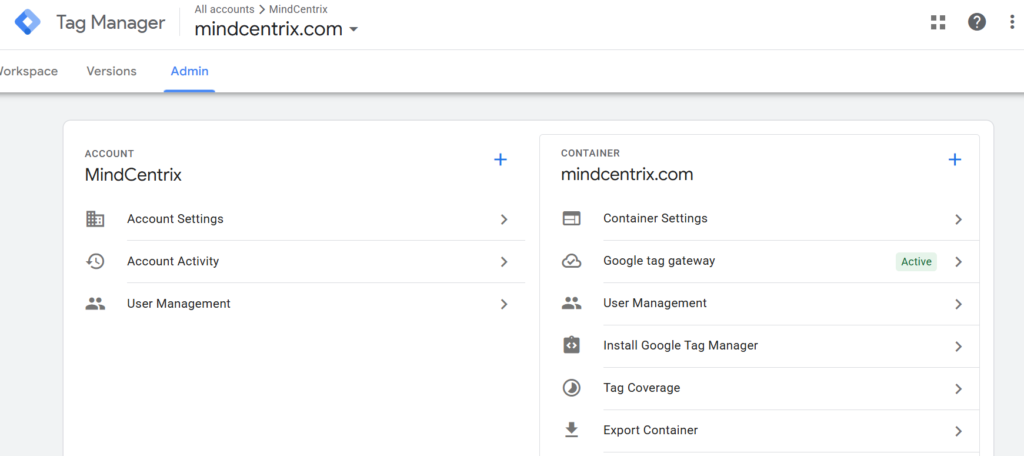
Step 1: Log into Google Tag Manager
Access your GTM container.
Navigate to:
Admin → Google Tag Gateway
Step 2: Enter Website URL
Provide the domain where your Google tags are implemented.
Example:
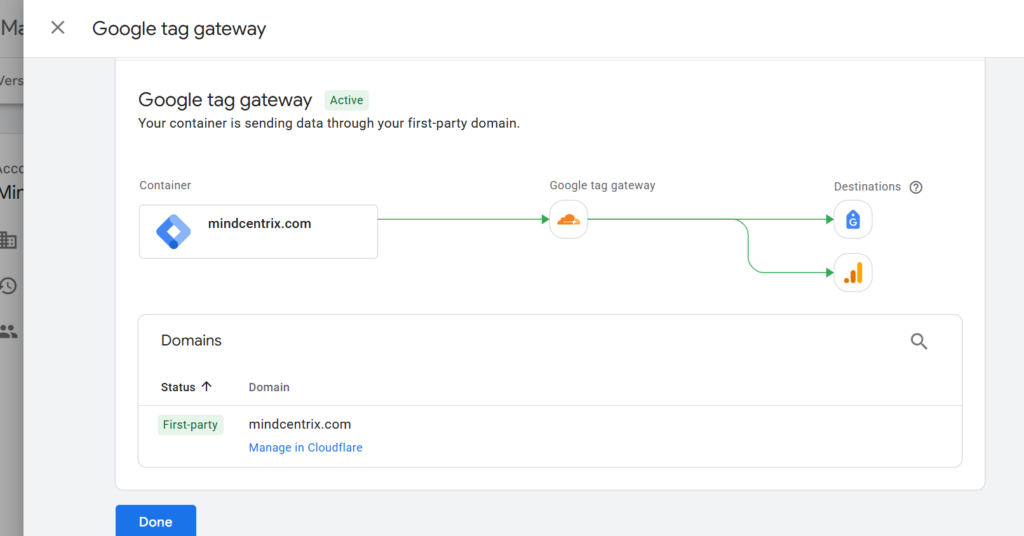
Step 3: Choose Cloudflare
Google currently supports Cloudflare as a deployment provider.
Select:
Cloudflare
Step 4: Authenticate Cloudflare
A popup window will appear.
Authorize access between:
- Google Tag Manager
- Cloudflare
Step 5: Select Domain
Choose the domain where you want to deploy Google Tag Gateway.
Verify carefully.
Incorrect domain selection is one of the most common setup errors.
Step 6: Approve Configuration
Review settings.
Confirm deployment.
Cloudflare will automatically configure the necessary infrastructure.
Step 7: Publish Changes
Complete setup and publish the configuration.
Step 8: Verify Deployment
Validation should always occur before considering implementation complete.
How to Verify Google Tag Gateway Is Working
After implementation:
GTM Preview Mode
Check:
- Tag firing
- Event collection
- Container behavior
GA4 DebugView
Verify:
- Page views
- Custom events
- Ecommerce events
- Conversions
Browser Developer Tools
Inspect:
Network → Requests
Look for successful tag delivery activity.
Google Ads Diagnostics
Confirm:
- Conversion tracking
- Enhanced conversions
- Attribution reporting
Analytics Reporting Validation
Compare:
Before Implementation vs After Implementation
Monitor:
- Sessions
- Events
- Conversions
- Revenue
Security & Compliance Considerations
For enterprise organizations, security matters.
Data Privacy
Google Tag Gateway does not remove privacy obligations.
Continue using:
- Cookie consent banners
- Consent Mode
- CMP platforms
- Privacy disclosures
Data Governance
Create documentation covering:
- Tracking architecture
- Data retention
- Consent policies
- Access permissions
Enterprise Review
Involve:
- Legal teams
- Compliance teams
- Analytics teams
- Security teams
Before rolling out large-scale implementations.
Common Google Tag Gateway Mistakes
Mistake #1: Treating It Like Server-Side GTM
Many organizations expect advanced server-side capabilities.
Google Tag Gateway is not a replacement.
Mistake #2: Skipping Validation
Never assume deployment equals success.
Always validate:
- Events
- Conversions
- Revenue tracking
Mistake #3: Ignoring Consent Settings
Consent configuration remains mandatory.
Mistake #4: Choosing the Wrong Domain
Double-check domain selection during setup.
Mistake #5: Not Monitoring Performance
Track:
- Event counts
- Conversion trends
- Reporting changes
After deployment.
Troubleshooting Guide
Tags Not Firing
Check:
- GTM container status
- Publish status
- Trigger configuration
Missing Events
Validate:
- GA4 setup
- Event parameters
- Consent mode
Missing Conversions
Review:
- Conversion definitions
- Google Ads setup
- Ecommerce implementation
Cloudflare Connection Issues
Verify:
- Account permissions
- Domain ownership
- Cloudflare access levels
Reporting Differences
Temporary reporting fluctuations may occur immediately after implementation.
Monitor for 7–14 days.
Enterprise Use Cases
Ecommerce Brands
Benefits:
- Better purchase tracking
- Improved attribution
- Stronger ROAS measurement
SaaS Companies
Benefits:
- Lead tracking
- Trial signup measurement
- Funnel optimization
B2B Organizations
Benefits:
- Form tracking
- CRM attribution
- Pipeline reporting
Agencies
Benefits:
- Easier deployment
- Faster client implementation
- Reduced maintenance
Enterprise Organizations
Benefits:
- Scalable infrastructure
- Improved reporting confidence
- Better governance alignment
Google Tag Gateway Best Practices
Audit Existing Tracking First
Fix broken implementations before deploying Google Tag Gateway.
Use Consent Mode
Always align with privacy regulations.
Maintain Documentation
Document:
- Architecture
- Tags
- Events
- Conversions
Monitor Monthly
Review:
- Tracking accuracy
- Event volume
- Attribution consistency
Consider Future Server-Side Tagging
As your analytics maturity grows, evaluate Server-Side GTM.
Final Thoughts
As browser privacy restrictions continue evolving, organizations need more resilient measurement strategies.
Google Tag Gateway provides a practical way to improve Google Analytics 4 and Google Ads measurement without the complexity of a full server-side architecture.
For many businesses, it represents one of the quickest wins available today for strengthening digital measurement.
Organizations that rely on attribution, conversion tracking, and analytics-driven decision-making should strongly evaluate Google Tag Gateway as part of their future measurement roadmap.
Google Tag Gateway FAQs
Questions marketers, analysts, and business leaders commonly ask about Google Tag Gateway, GA4 measurement, conversion tracking, attribution, privacy-first analytics, and implementation.
What is Google Tag Gateway?
How does Google Tag Gateway work?
Is Google Tag Gateway free?
Does Google Tag Gateway work with GA4?
Can Google Tag Gateway improve Google Ads conversion tracking?
Does Google Tag Gateway replace Server-Side GTM?
Does Google Tag Gateway require Cloudflare?
Is coding required?
Can ecommerce stores use Google Tag Gateway?
Does it improve attribution?
Is it GDPR compliant?
Does it work with Google Tag Manager?
How long does setup take?
Does it impact website performance?
Should enterprise organizations use it?
Need Help Implementing Google Tag Gateway?
Our analytics and measurement specialists can help you improve tracking reliability, attribution accuracy, and Google Ads performance measurement.
Book a Consultation

Boost Your Brand Visibility 🚀
Get personalized digital strategies that drive growth and engagement.
Let’s Talk📬 Stay Updated
Get the latest insights and guides delivered right to your inbox.
🔗 Related Topics
- Loading related posts...